I'd probably die if I tried doing a cartwheel right now.
Actual physical cartwheels aren't the point of this post. The new
Target Cartwheel app very much is in a "so speaking of coupons" kind of way . . . .
Like I said in the post before last I figured I'd probably need to run out before the two weeks between big grocery trips were up for a few more things. Shocker. I was right. I was doing my normal browsing for coupons on Target's website and saw a link for something called Cartwheel. OK. Creative name? I guess. I went about browsing other things until I finally let my curiosity get me.
(Note: all of this will be based on the regular browser site not the phone apps.)
It's a quick, simple sign up if you have facebook (which I do so that was that). There's a lot going on at first it seems. Observe this lovely screenshot:
You may able to see on this screenshot that it shows a little ticker for total saved: $1.38. That was yesterday. That's pretty quick.
So here's how it works:
#1 Sign up - It's simple enough if you are all ready on facebook. If not, I'm not seeing many other options. Someone can let me know if it works with Google+ or just a regular email account. I didn't need any invite or code to get on. I just clicked the sign up with facebook button and it did that little creepy info-grabbing thing apps do and I was done.
#2 Take a second to get acclimated - There is quite a bit going on. Collections, badges, notifications, facebook settings, invitations, and all these clickable, shiny ad buttons that remind me of that brand guessing game that was popular for a bit.
#3 Settings - By clicking over your name at the top right of the screen you can get to settings. This is something you'll want to change first. Decide if you want your cumulative savings to be public and whether or not you want in-app notifications. There's another link on the bottom of this page to change facebook settings.
#4 Browse through Collections - These are just categories for all the products Target carries that have an available discount. That is what you're seeing in the screenshot above. Here's an example of what you'll see when you click on a collection:
Discounts range from 10-30% off all sorts of products.
They even have discounts on mundane things that almost never have coupons like milk, cheese, fruit, and eggs. Yes. It's true.
Note: You're not limited to browsing through tons of collections. There's a
search bar. You can type in brand names, generic items (cereal, cookies), specific items, or broad categories (baby, toys).
#5 See that fancy bar on top of the screen between browse and total saved. - This is your total available discounts. You do have a limit. You start with 10 just for joining and there are ways to earn more as you use the app. I'm up to 17 now and I just opened this for the first time
yesterday.
#6 Look at your badges. - This is your gateway to increasing the limited number of discounts you can choose. Anything from inviting people (as long as they join in) to having your first cartwheel scanned adds up to more discounts.
#7 Notifications - The word pretty much sums it up. This just just a heads up of the latest goings on within your cartwheel. You can see the badges you've earned, friends who've started using the app, and all that boring stuff.
Here's essentially how it works:
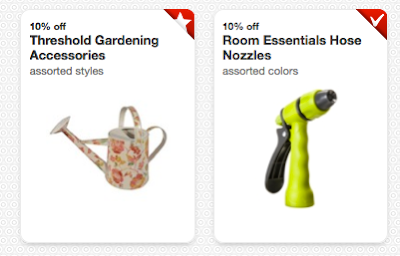
You browse through the site. You're scrolling down and find a discount you want. Just click on the box and it'll flip itself around. (nifty!) On the back of the "card" you can choose to add, share (via facebook), or get details on that specific discount. Once you click add it's on your "my Cartwheel" list. That bar at the top keeps track of how many you've used so far. To see your compiled list click on the my Cartwheel tab. A discount "card" all ready in your cartwheel will have a white on red check in the upper right corner and one that is still available to be added will show a white on red star.
Like this:
The hose nozzle is in your cartwheel and the gardening accessories are NOT.
As you browse, you can add or replace things as you see fit. If you're all ready at 10/10 (or 17/17 or whatever the case may be) items then you'll have to remove something from your list before adding another.
You could probably keep at this, browsing, choosing, comparing and searching for a while. Once you are done go back to the my Cartwheel page. Click on "redeem in store" to print out your list. There will be one barcode at the top for the Target team member to scan.
JUST LIKE A REGULAR COUPON! It's so simple!
But wait, there's more! (imagining this statement in George Takei's voice would be optimal)
This is not an either-or situation. These discounts DO stack with target coupons and manufacturer coupons. They also work with the redcard discount. I'm told that you could potentially have a quintuple whammy: cartwheel + target coupon + manufacturer coupon + redcard discount + reusable bag discount.
Your printed list will also show the number of times a discount can be applied. For instance, I had the Market Pantry milk 5% discount on my list yesterday. The list noted up to four purchases with the discount. I got two gallons so I got 5% off EACH one.
If you don't buy something on your list or if you've used up some of them it's not a big deal. You can either get your list back from the team member after they scan it or have them toss it and you can print a new one. If you don't get the correct item, the discount is expired (the deals do expire like normal coupons), or you've all ready reached your purchase limit it simply won't take it off your total.
It's a brilliant app! I was hesitant about it at first wondering if it would be worthwhile. The team member that helped me was all ready up to speed and HAPPY to see I'd brought it along with my coupons (yeah, not put off or annoyed). It was just as easy as using regular coupons but she only had to scan the single code one time to apply multiple discounts.
Hopefully this helps someone out. Go
here and sign up online! It's totally worth the discounts just on the unusually discounted items in my opinion. Worst case, if you hate it then don't use it again!
Here is the app for Android
<3